

Integration guide
Webhook integration
Receive meeting processing events securely and recover failed deliveries.
Delivery flow
Set up a webhook
- 1
Prepare your receiver
Provide a public HTTPS POST endpoint that preserves the raw body, verifies authentication, and durably accepts work.
- 2
Add the webhook
In workspace Automation > Webhooks, set the URL, authentication, event and any team or label filters. You need the workspace webhook management permission and an eligible plan feature.
- 3
Save the key and enable
The full key is shown once. Store it securely, test with example data, and enable the webhook.
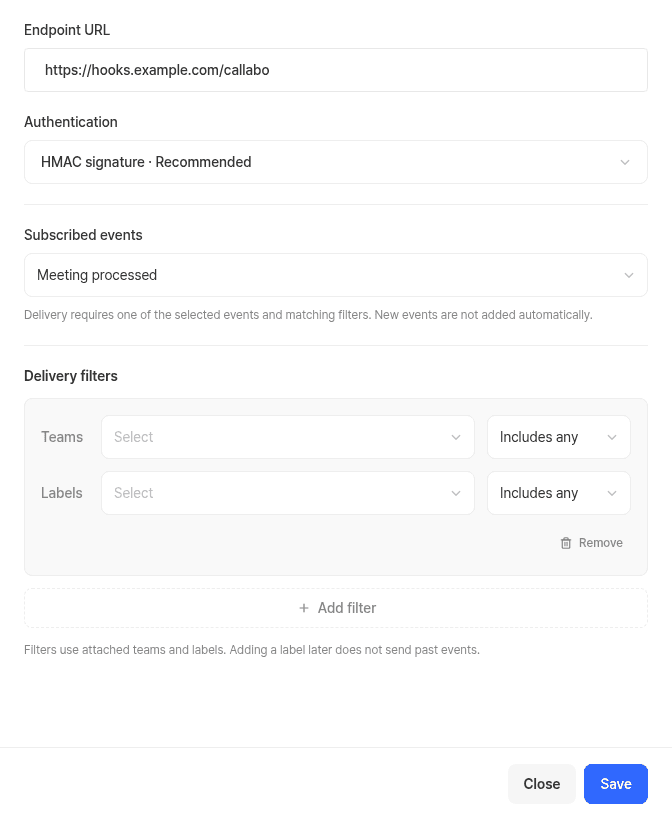
Go to Automation > Webhooks > Add webhook.
- Endpoint URL: Enter the HTTPS address that receives events.
- Authentication: Choose an HMAC signature or secret header.
- Subscribed events: Select the events you want to receive.
- Delivery filters: Combine teams and labels and add filters as needed.
Events and filters
- The current automatic event is
record.processed. An explicit test sendswebhook.test. - Multiple filters use OR. Team and label conditions within one filter use AND; each condition can match any or all selected items.
- Conditions and permissions are checked when delivery targets are first selected and checked again before each attempt. Adding a label after target selection does not send old events.
Payload and headers
New webhooks use v2 JSON with id, type, timestamp, schema_version, and data. The event id stays the same across retries and manual redeliveries.
The default HMAC method sends the three headers below without transmitting the secret. The secret-header method sends the key in x-webhook-secret, so HTTPS is required.
Existing v1 integrations retain their payload and authentication. They can move to v2, but v2 cannot be changed back to v1.
Example headers
Content-Type: application/json
webhook-id: evt_0123456789abcdef0123456789abcdef
webhook-timestamp: 1793606780
webhook-signature: v1,<base64-hmac-sha256>
Example body
This illustrative excerpt shows the common structure. Comments are not included in actual JSON.
{
  "id": "evt_0123456789abcdef0123456789abcdef",
  "type": "record.processed",
  "timestamp": "2026-11-02T08:06:00Z",
  "schema_version": 2,
  "data": { /** Content depends on the event type **/ }
}
Payload schema
idRequiredstringEvent ID, preserved across retries and redeliveries.typeRequiredstringEvent type.timestampRequiredstringEvent occurrence time, distinct from the signature timestamp.schema_versionRequiredintegerPayload schema version.dataRequiredobjectEvent data varies by event type. The fields below describe the current meeting processed and test events.workspace_idRequiredintegerWorkspace ID.recordRequiredobjectProcessed meeting information.ownerRequiredobject | nullMeeting owner, or null if unavailable.teamsRequiredarray<object>Teams associated with the meeting.labelsRequiredarray<integer>IDs of labels attached to the meeting.eventRequiredobject | nullAssociated calendar event, or null. Fields vary by event.phone_numberRequiredstring | nullAssociated phone number, or null.dialogsRequiredarray<object>Meeting transcript segments.insightsRequiredarray<object>Insights generated from the meeting.
Verify the HMAC signature
Remove the whsec_ prefix and Base64-decode the rest to obtain the key. Compute HMAC-SHA256 over the UTF-8 string webhook-id.webhook-timestamp. followed by the original body bytes, then compare with the v1, signature in constant time.
Verify before parsing or normalizing JSON. The example allows a five-minute timestamp tolerance to mitigate replay attacks. Synchronize your server clock and do not return success when verification fails.
After verification, store webhook-id to deduplicate events. Automatic retries and manual redeliveries use the same event ID, so account for your deduplication policy when intentionally reprocessing an event.
import { createHmac, timingSafeEqual } from "node:crypto";

// Pass the original request body as a Buffer before parsing JSON.
export function verifyWebhook(rawBody, headers, secret) {
  // Check the required headers and key format.
  const id = headers["webhook-id"];
  const timestamp = headers["webhook-timestamp"];
  const signature = headers["webhook-signature"];
  if (typeof id !== "string" || typeof timestamp !== "string" ||
      typeof signature !== "string" || !/^\d+$/.test(timestamp) ||
      typeof secret !== "string" || !secret.startsWith("whsec_")) return false;

  // Check that the request timestamp is within five minutes.
  const seconds = Number(timestamp);
  if (!Number.isSafeInteger(seconds) ||
      Math.abs(Date.now() / 1000 - seconds) > 300) return false;

  // Remove the prefix and decode the Base64 key.
  const encodedKey = secret.slice(6);
  const key = Buffer.from(encodedKey, "base64");
  if (key.length !== 32 || key.toString("base64") !== encodedKey) return false;

  // Sign the event ID, timestamp, and original body.
  const expected = createHmac("sha256", key)
    .update(Buffer.from(id + "." + timestamp + "."))
    .update(rawBody).digest();

  // Check the length and compare v1 signatures in constant time.
  return signature.split(" ").some((part) => {
    const [version, encoded] = part.split(",");
    if (version !== "v1" || !encoded) return false;
    const received = Buffer.from(encoded, "base64");
    return received.length === expected.length &&
      timingSafeEqual(received, expected);
  });
}
Responses, retries, and history
- Return HTTP 2xx after the request is durably accepted. Queue long-running work.
- New automatic deliveries retry 408, 425, 429, 5xx, timeouts and transient network errors without an attempt limit, within three days of delivery creation. Tests are attempted once.
- Retries use exponential backoff with equal jitter. After the previous attempt finishes, the first retry waits one minute; subsequent delays are chosen from 1–2, 2–4, 4–8 and 8–16 minutes, and each subsequent range doubles. A later
Retry-Afteris respected; the delivery fails if the next attempt would reach or exceed the three-day deadline. - Other 4xx responses, redirects, certificate errors and unsafe URLs are not retried automatically. HTTP 410 disables the webhook and cancels pending deliveries. Existing integrations retain their legacy retry policy after a payload upgrade to v2 until the retry policy is migrated separately.
- Delivery history and request and response bodies are retained for up to 30 days. Bodies may be purged earlier when a meeting is deleted or the PII policy changes. Failed deliveries can be redelivered from the management screen; successful deliveries cannot.
Rotate the key
Apply a new key immediately or schedule it for 1, 7, 14, or 28 days later. The new key is shown only once. Prepare the receiver to use the new key at the scheduled time. An uncancelled rotation takes effect at that time.